

Learn & practise
Find an answer, browse a topic or open the metronome.
Search is unavailable. Browse all guides or use the topics below.
Search results
Browse topics
Reference on this page
How to use the online metronome
Set a tempo from 30 to 300 BPM with the ruler, −/+ buttons or number field, then press Start. The beat animation and audio begin together. Stop leaves the beat indicator still.
In portrait, Controls starts closed. Use it to show or hide Reset, Meter, Subdivisions, Accents and Sound. Choose Accents to change the strength or silence of individual beats and to turn Accent sound on or off. Choose Sound to select Precise, Warm, Bright or Mechanical. Close Controls to give the beat animation more room; Start or Stop, volume and tempo remain available. In landscape, the five controls stay visible. Opening, closing or rotating the screen does not change playback or your settings. The question-mark icon opens Learn & practise. It and the Practice button return when playback is paused or stopped.
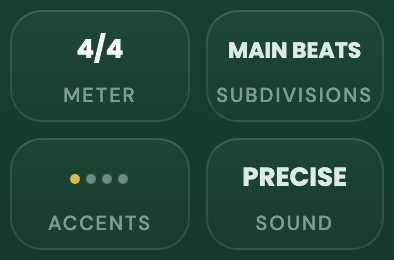
Portrait Controls · closed, then opened
- Start with Controls. In portrait, Controls starts closed. Open it to reveal the settings.
- Choose the setting you need. Meter sets the time signature; Subdivisions sets the clicks within each beat; Accents sets beat strength or silence; Sound changes the click character. Reset is also available outside this detail. Closing Controls gives the beat display more room.
For focused practice, begin at a BPM where the music feels controlled. Increase the tempo gradually after you can repeat the passage accurately and without tension.
BPM, tempo markings and beat units
BPM means beats per minute. The drawn note beside the number tells you which note counts as one beat. Meters with 2 as the lower number use a half-note beat; meters with 4 as the lower number use a quarter-note beat. The beat is an eighth note in 3/8, 5/8, 7/8, 8/8 and 11/8. It is a dotted quarter note in 6/8, 9/8 and 12/8.
The Italian tempo name shown above the BPM is a rough guide, not a rule. Its meaning changes with the style and the music. In meters with unequal groups, such as 5/8 or 7/8, use the BPM number and what you feel in the bar as your main guide.
| BPM | Tempo name |
|---|---|
| 30–59 | Largo |
| 60–75 | Adagio |
| 76–107 | Andante |
| 108–119 | Moderato |
| 120–155 | Allegro |
| 156–167 | Vivace |
| 168–199 | Presto |
| 200–300 | Prestissimo |
Tap tempo
Tap the tempo name, BPM number or ruler in time with a song or the pulse you have in mind. The third tap sets the tempo, and further taps refine it. The dots below the ruler confirm each accepted tap. Sliding the ruler still adjusts the BPM directly. If more than about two seconds pass between taps, a new estimate begins.
Tap tempo sets the unit currently shown beside the BPM number: half notes, quarter notes, eighth notes or dotted quarter notes depending on the selected meter.
Time signatures and beat divisions
Choose 2/2, 3/2, 4/2, 2/4, 3/4, 4/4, 5/4, 6/4, 7/4, 3/8, 5/8, 6/8, 7/8, 8/8, 9/8, 11/8 or 12/8. Meters with 2 as the lower number use half-note beats. In 3/8, each eighth note is one beat. In 6/8, 9/8 and 12/8, each dotted quarter note is one beat.
Some meters can be grouped in more than one useful way. Grouping changes which beats sound stronger; it does not change the length of the bar. For example, 6/4 can be grouped 3+3 or 2+2+2. The default 8/8 grouping is 3+3+2.
Subdivisions sets which beat positions produce audible clicks. Choose Main beats for one click on each meter-defined beat, with no smaller clicks. 8ths and 16ths add those note divisions. The tuplet choices adapt to the meter: Triplets and Sextuplets in simple beats, Duplets and Quadruplets in compound beats, and the exact combination in mixed meters. Choose Between beats to hear positions between the main beats while leaving the main beats silent. Changing Subdivisions does not change the BPM or the length of the bar.
Swing changes suitable even divisions into a long–short feel without changing the BPM or bar length. Straight is even. Shuffle uses a 2:1 long–short feel. Choose 8th Swing to swing the eighth-note level, or 16th Swing to keep the eighth notes in place and swing the sixteenths between them.
Some meter and Subdivisions choices do not have a division that Swing can move. When that happens, the unavailable Swing choice is disabled. If you change Meter or Subdivisions, Browser Metronome keeps a Swing setting that still affects the sound or returns it to Straight.
Edit accents
Choose Accents, then choose a beat to move through Accent, Normal, Soft and Mute. The first beat is Accent by default. Accent is strong, Normal is regular and Soft is quieter. Mute silences that beat and its selected smaller clicks while the visual beat continues. The Accent sound switch below the beats changes whether beats marked Accent use the emphasized or regular click; turning it off never changes their assignments. Choose Reset to restore the usual accents for the selected meter and grouping without changing the switch.
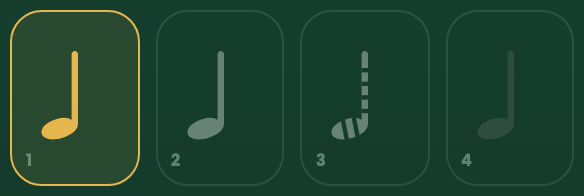

Example: custom accents in 4/4 · Accent sound on
- Each beat has its own assignment. Here beat 1 is Accent, beat 2 Normal, beat 3 Soft and beat 4 Mute. Choose a beat repeatedly to cycle through those settings. Mute silences that beat and its smaller clicks; the visual beat continues.
- The switch changes the emphasized click. Accent sound is on here. Turning it off keeps the Accent assignments and uses the regular click for those beats. It does not unmute beat 4.
Choose a click sound
Sound changes the click character without changing its timing, meter, Subdivisions or Accents. Precise is short and clear. Warm has a softer character. Bright stays clearer against louder playing. Mechanical is a dry traditional tick. Choose Preview while stopped to hear the selected sound's metrical hierarchy. A Sound change made while Quick Metronome is running or paused is queued and becomes active at a bar boundary.
Visual beats and keyboard controls
When focus is outside a control, use Space to start or pause. T records a tap, R resets, and the arrow keys adjust the tempo by one BPM.
Practice tools
Speed Trainer changes tempo after a chosen number of complete bars. Gap Trainer alternates click and silent bars. Session runs for a chosen number of bars or minutes. Each tool can begin with a count-in. Practice progress and results stay in the open page.
See the complete Practice instructions for every setting, examples, session controls and browser limitations.
On a Speed, Gap or Session setup screen, choose Share practice to create a link with supported setup values. The link does not start audio or include sound, volume, progress or results. See sharing a Practice setup for details.
Using other apps and working offline
Playback is most reliable while the metronome is open on screen. The installed Home Screen app may keep playing when you open notes, switch apps or lock the screen. The phone or computer can still interrupt it. If Resume is shown, tap it to continue from the paused position. If Start is shown, begin again; your settings remain, but practice progress and count-in start over.
After one successful online visit, some browsers save the files needed to use Browser Metronome without an internet connection. Links from other apps may still open in a browser tab instead of the Home Screen app.
Read the offline preparation and recovery guide before relying on a cached page.
Fix a problem and find quick answers
How do I use an online metronome?
Set a BPM and press Start. See starting and stopping for the controls and a first practice step.
What BPM should I practise at?
Choose a tempo where the passage stays accurate and relaxed. Use the Speed Trainer routine when you are ready to raise it.
How does tap tempo work?
Tap the tempo name, BPM number or ruler three times. The Tap tempo instructions explain the beat unit and further taps.
What do Largo, Andante and Allegro mean?
They are approximate Italian tempo descriptions. Compare the displayed ranges with the style and pulse of the music.
What do the dots between the notes mean?
The marks show where the beat and its smaller divisions fall. Long marks begin the displayed beats. Round and short marks show the smaller positions between them. Change Subdivisions or Swing and the marks move to show the rhythm you will hear.
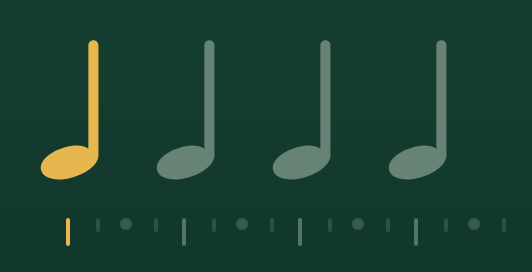
Example: 4/4 · 120 BPM · 16ths · Straight · stopped
- Read one beat at a time. Each large note is a main beat. In this 16ths example, each long mark begins a beat, the round mark is its halfway eighth-note position, and the short marks fill the sixteenths between. Count “1 e & a, 2 e & a…” across the bar. Subdivisions determines which positions click; Swing can change their spacing.
What do Accents, Accent sound and Subdivisions change?
Use Accents to set each beat to Accent, Normal, Soft or Mute. Accent sound, found inside Accents, gives beats marked Accent an emphasized click. Turning it off keeps those Accent assignments and uses the regular click for them. Use Subdivisions to choose which beat and between-beat positions you hear. Swing changes the spacing of suitable divisions from even to long–short.
Why is the strong click on the wrong beat?
Open Accents and check the setting below each beat. Accent is strong, Normal is regular, Soft is quieter and Mute is silent. Choose Reset in the Accents panel to restore the meter’s usual accents.
Can I use a keyboard?
Yes. Space starts or pauses when focus is outside a control. See keyboard controls for Tap, Reset and tempo shortcuts.
Does the metronome work offline?
It can. First open Browser Metronome once while online. Some browsers then save the files it needs. Adding it to your Home Screen is optional.
For the cache requirement, storage limits and a pre-rehearsal check, see using Browser Metronome offline.
Will it keep playing in another tab or with the screen locked?
It may, especially from the installed Home Screen app, but this depends on the phone, browser and other apps using sound. If the click stops, return to Browser Metronome and follow the button shown. Tap Resume to continue a confirmed paused run; if Start is shown, begin a new run from your settings. Keeping the screen awake works only on supported devices while the metronome remains visible.
Why can’t I hear the metronome?
Check the controls in this order:
- If Gap Trainer shows Silent, keep playing through the planned silent bars; the click returns with the next click section. See the Silent state example.
- Check the button shown. Resume continues a paused run; Start begins a new run. Do not restart an active run just to test the sound.
- Check Accents for beats set to Mute. A muted beat and its smaller clicks are intentionally silent. In Practice, Accents are in setup. Stop returns to setup and asks before discarding completed practice; use it only if you want to change those settings.
- Raise the metronome volume slider. The visual metronome setup opens with volume at zero.
- Raise your device’s media volume.
- In a browser tab, turn off Silent Mode and check that the tab can play sound.
On supported iOS versions, the installed Home Screen app can remain audible in Silent Mode. After an interruption, return and follow the message on screen: Resume continues a confirmed paused position; Start begins a new run.
Is Browser Metronome free and private?
Yes. It is free and ad-free, requires no account, and does not use tracking, cookies or analytics.
What is Practice?
Practice offers Speed Trainer, Gap Trainer and Session. See Practice tools to choose one.
How does Speed Trainer change tempo?
It changes BPM only after the chosen number of complete bars. It reaches the selected target exactly and plays a complete final block there before finishing.
What happens during Gap Trainer’s silent bars?
The click stops for the selected number of bars, but the visual beat continues. Keep playing through the silence. The click returns at the start of the next click section.
Are practice settings or results saved?
Browser Metronome does not save Practice settings or results to an account. Changes you make and results from a run disappear when the page is reloaded or closed; an entry link reopens its starting setup. If you choose Share practice, supported setup values are placed in a link; progress and results are not included. See Privacy for how a shared URL may be handled.